Trading2gether block tape template
for Jigsaw
A configuration built to spot large blocks, aggressive executions, institutional repetition and the zones of pressure visible in the tape.
Why this template?
On this page "Block" means a single print, usually 1×1: an aggressive market order meeting one passive order. The template isolates those prints so you can spot:
Single prints of real size — the sign of a structured 1×1 exchange between the aggressor and one passive counterparty.
An imbalance between the aggressive and the passive side that gives away a directional intent at one level.
Blocks repeating at the same price or near it — the signature of injection, of micro absorption, or of distribution.
Structured passive volume that holds against the aggressive walk — a turn, or a consolidation, in the making.
Spot where the institutional players step in, by judging the quality of the counterparty — a clean 1×1 against a chopped-up FIFO fill.
A clean 50 lots does not mean what a 50 split across 20 prints means. The template makes the difference visible.
Do not confuse the two: Jigsaw can colour and filter prints according to your settings. That does not make them a "programmed sweep order" or an "off-book block trade". What you are reading here is the prints and their structure. The template is a visual tool — the edge comes from the reading and the context.
The Trading2gether definition — the Jigsaw Tape
When this page says "Block" in Jigsaw, it does not mean the regulated, off-book "Block Trade". Here "Block" means a single print — one hit — which very often corresponds to a 1×1 exchange: one market order, aggressive, meeting one limit order, passive, at the best price.
Jigsaw can colour and filter prints according to your settings. That does not make them a "programmed sweep order" or an "off-book block trade". What you are reading here is the prints and their structure.
It tells you about the counterparty. The same total volume is not the same quality. A "clean" 50 does not mean what a 50 split across 20 prints means.
Why a big market order does not always print as a "block"
This matters: a 50-lot market order does not necessarily appear as "50" in the tape. It all depends on how the liquidity is structured at the best price.
If the liquidity at the best price is fragmented, the market order eats several small orders. FIFO here means First In, First Out: the order in which the pending limit orders in the book get filled. The first order placed at the best price is served first, then the second, and so on.
If 200 lots sit at the ask but split across several orders (1, 1, 5, 1, 2, 15, 5, 5, 8, 2, 2…), a 50-lot market order hits them in the order they arrived, which produces a fragmented sequence in the tape.
The aggressor may well be institutional, but the counterparty is many. The reading is usually more "chopped up".
If the liquidity holds one large passive order (say 70, 2, 10, 1, 1…), then a 50-lot market order can print as a single "50":
It is often that kind of single print that becomes usable — especially when it repeats, and when it sits somewhere that matters.
Real examples, to be read in context
A block gets interesting once you put it back in its context — structure, liquidity, reaction, timing. The captures below are something to observe, not a signal.
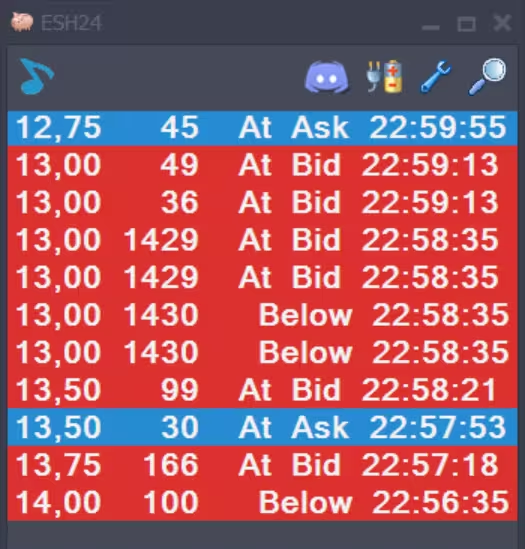
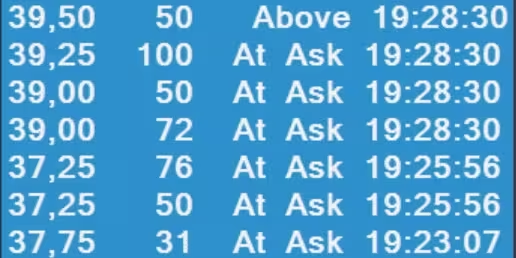
Another reading: small blocks at nearby prices, there all the time
Many people think blocks only show up at special moments — the close, month end, a rollover. In fact small blocks can appear continuously: at the same price, at nearby prices, at the same instant or at different ones. See image 2
Once you start spotting the repetitions — the same timestamp, prices close together — you start reading behaviour: injection, micro absorption, a counterparty distributing. None of which the chart alone shows you.
In the Trading2gether LMS this reading goes further, with categories you will not find elsewhere — "machine-gun blocks" and "injectors", visible and invisible — and, above all, how to validate them against the DOM.
The settings that matter (and how to use them)
This template sets a size filter on Jigsaw's ReconTape. Here is what to understand to get the most out of it.
Size filter — the detection threshold
The template applies a filter that highlights blocks above a lot threshold. The default is ≥ 49 lots. That threshold filters out the noise — small prints — so only the structured prints that matter show.
- • Threshold: ≥ 49 lots
- • Instrument: ES / NQ (adapt it)
- • Volatility: US open against a range
- • Isolates the prints that mean something
- • Shows the quality of the counterparty
- • Cuts the visual noise in the tape
You recognise a clean block by a single print — one hit — of real size. That means one passive order absorbed the whole of the aggressive one: a high-quality counterparty.
One block on its own is not enough. The edge comes from the repetition (same area, same timestamp), from where it happens (a level that matters) and from how the DOM answers.
Icebergs and "counterparty" algos
The market has moved on: some algos can fire aggressive executions precisely when an iceberg counterparty is available, which sometimes produces small repeating blocks. It sharpens how you read absorption: you are not just looking at "big volume", you are looking at the quality of the counterparty.
Cleaner exchanges, structured prints, sometimes repeating blocks (algo against iceberg, algo against algo). The reading is steadier, because the counterparty is usually better "organised".
Only one professional side is absorbing, and the counterparty is fragmented — mixed or retail. The prints are choppier and the FIFO sequences more irregular. This is where the tape earns its keep.
Installing the template (Windows)
Install the file, restart Jigsaw, then pick the template from the list.
Download the file below. If it is a ZIP, unzip it to get the XML file.
Copy the XML file into Jigsaw's ReconTape folder — the exact path is below.
Close Jigsaw completely and open it again, or the template will not appear in the list.
In Jigsaw, open the ReconTape and pick the template from the dropdown.
Copy the XML file here:
If your file is a .zip, unzip it first, then copy the .xml into place. Close and reopen Jigsaw after copying.
Want to read blocks the way a professional does?
The course teaches you to tell the shades apart — machine-gun blocks, injectors, clean absorption against one-sided — and to validate them against the context: the DOM, liquidity, reloading, gaps, the reaction.
- ✓ Tell clean absorption from chopped-up absorption
- ✓ Spot the repeating patterns (small blocks)
- ✓ Connect the tape to the DOM (liquidity, reloading, gaps)
- ✓ Build a clean, repeatable execution
Frequently asked questions
Short answers to help you install the template and understand it.
Why does Jigsaw not "guess" the blocks for me? +
Because a block on the Jigsaw Tape is a way of reading — a single print, often 1×1 — and not a regulatory label. Jigsaw shows the prints; judging the quality is the trader's job: the counterparty, the repetition, the context.
What is the difference between an off-book "Block Trade" and "Block" on this page? +
The regulated "Block Trade" is a negotiated transaction done through a dedicated, off-book mechanism and then reported. Here "Block" means the Trading2gether sense: a single print on the tape, often the signature of a 1×1 exchange — one aggressive order against one passive order.
Is the template universal? +
It is a Trading2gether starting point: mostly a size filter — showing blocks of 49 lots and up, for instance. That threshold has to be adjusted to the instrument and the volatility: US open against a range, ES against NQ, and so on.
I cannot see the template in Jigsaw. What now? +
Check the exact folder (Templates\ReconTape) and the extension (.xml), then restart Jigsaw after copying.
Educational content only (demonstrations). No financial advice.