Trading2gether sweep tape template
for Jigsaw
A configuration built to read sweeps, execution speed, aggressive blocks and the imbalance visible in the tape.
Why this template?
A sweep is not just a big print. It is an aggressive walk through levels that reveals an intent — taking liquidity, triggering stops, accelerating. This template helps you spot:
A fast walk through levels with volume on the initiative side, bid or ask.
Prints bunched into a short range — the signature of a programmed execution.
A sudden change of pace in the flow — often what comes before a push.
An imbalance between buying and selling aggressors at one level.
Passive-side volume that resists the walk — a turn, or a consolidation.
Who is taking the liquidity? Who is providing it? The answer changes everything.
Do not confuse the two: the "Sweep" Jigsaw highlights is a signature in the prints, a filter and a way of drawing them. A sweep order is something else: an order programmed to fire when certain conditions are met.
Bookmap (an ID) against Jigsaw (a signature)
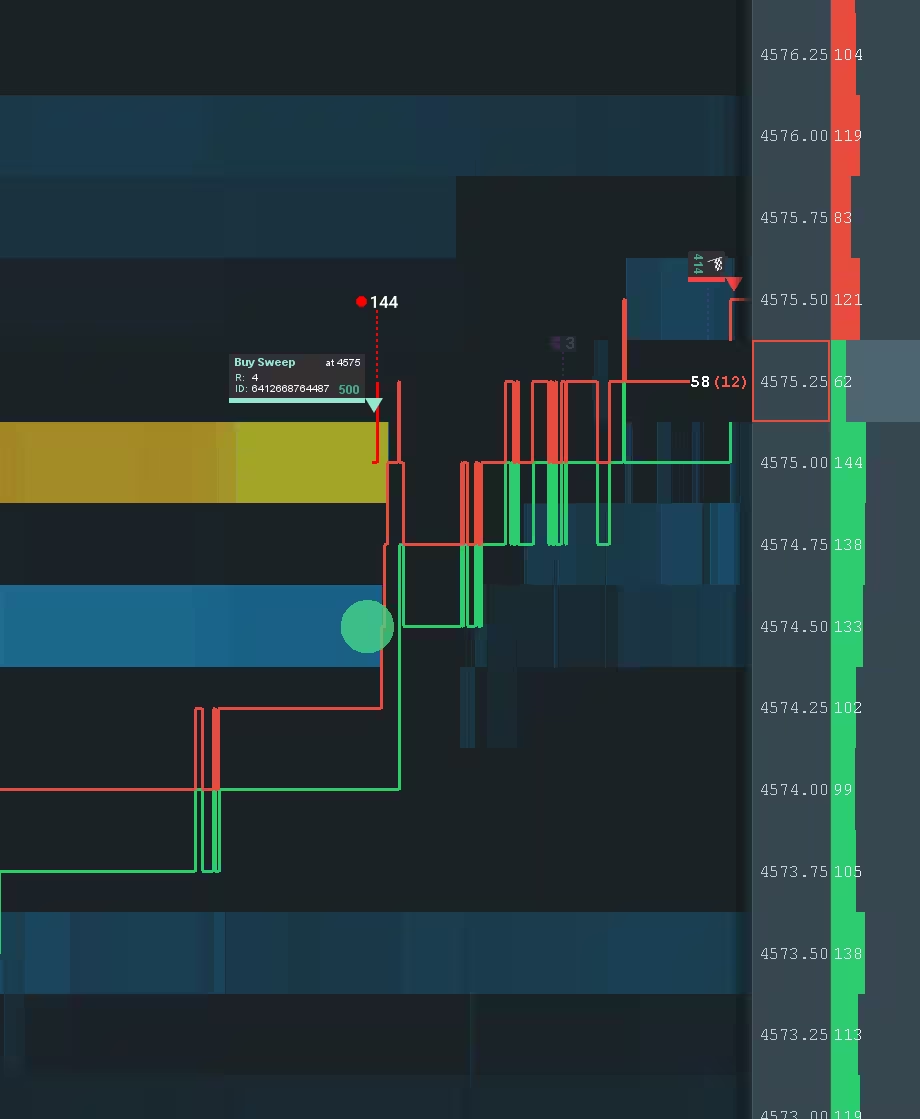
Bookmap can group a sweep as one event with an ID. On Jigsaw you see the prints: a direct reading that forces you to recognise the signature — time, range, aggression. That skill changes how you read the market.
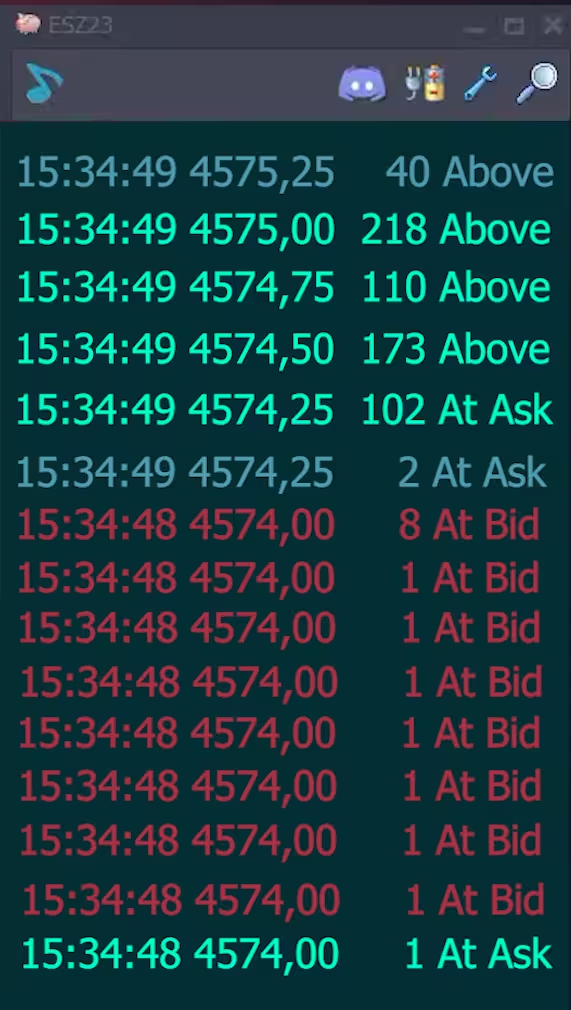
You are reading prints: what counts is speed, simultaneity and range. See image 1
An ID makes one event easy to track. Handy, but the context is still the work. See image 2
A sweep becomes usable when you validate it — where, against what, and what happened next — and when you combine it with the DOM and the tape.
The settings that matter (and how to use them)
This template sets a sweep filter on Jigsaw's ReconTape. Here is what to understand to get the most out of it.
Sweep filter — the detection threshold
The template sets a filter that highlights sweeps above a lot threshold. The default is > 49 lots. That threshold filters out the noise — small executions — so only the walks that matter show.
- • Threshold: > 49 lots
- • Instrument: ES / NQ (adapt it)
- • Volatility: US open against a range
- • Filters out the prints that mean nothing
- • Makes real aggression stand out
- • Cuts the visual noise in the tape
You recognise a sweep on the tape by its speed, by how simultaneous the executions are, and by the price range it covers. The three together are the signature.
The sweep alone is not enough. The edge is in the validation: where did it happen, against what, and how did the market answer? It is the DOM and the tape together that make it readable.
Installing the template (Windows)
Install the file, restart Jigsaw, then pick the template from the list.
Download the file below. If it is a ZIP, unzip it to get the XML file.
Copy the XML file into Jigsaw's ReconTape folder — the exact path is below.
Close Jigsaw completely and open it again, or the template will not appear in the list.
In Jigsaw, open the ReconTape and pick the template from the dropdown.
Copy the XML file here:
If your file is a .zip, unzip it first, then copy the .xml into place. Close and reopen Jigsaw after copying.
Want to read sweeps properly?
The template helps you see. The real edge comes from the context: where the sweep happens, who is being aggressive, which liquidity is hit, and how the market answers afterwards.
- ✓ Telling a real sweep from noise
- ✓ Reading the intent — which liquidity is being aimed at
- ✓ Combining it with absorption, gaps and reloading
- ✓ Building an execution that is clean and repeatable
Common questions
Quick answers to help you install and understand the template.
Why does Bookmap tag a sweep with an ID and Jigsaw does not? +
Bookmap can use more granular data — MBO, event grouping — to tie an aggressive execution to a single event with an ID. On the Jigsaw tape you are mostly reading prints from Time & Sales: the tool highlights an execution signature, speed plus price range, but gives no unique sweep ID.
Why does Jigsaw not show the sweep's ID? +
Jigsaw works mainly from displaying prints and visual filters, not from MBO-style event identification with a unique ID. So you recognise the sweep by its signature: time, price range, aggression.
How do you read a sweep on Jigsaw without an ID? +
You infer it from the signature: near-simultaneous executions across several levels, a fast walk through prices, aggressive pressure on one side over a short range. And the key part — watch the reaction too: acceleration, pause, absorption, retest.
Is the template universal? +
It is a Trading2gether starting point with a filter — highlighting sweeps above 49 lots, for instance. That threshold is NOT universal: adapt it to the instrument (ES/NQ) and the volatility (US open against a range).
I cannot see the template in Jigsaw. What now? +
Check the exact folder (ReconTape), check the extension (.xml), and restart Jigsaw after copying. The installation section below covers it.
Is this a trading recommendation? +
Educational content only (demonstrations). No financial advice.
Educational content only (demonstrations). No financial advice.